Sample scene
Before implementing data collection in your project, you might want to become more familiar with it by looking at a sample scene that includes all the existing functionalities.
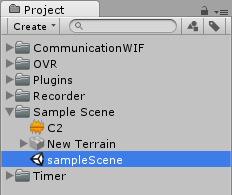
To open the sample scene, navigate to the Sample Scene folder and double click the sampleScene file with a Unity icon.
The Hierarchy view contains several game objects.
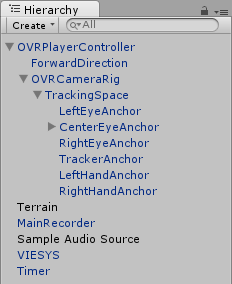
- The
MainRecorderGameObject manages the data output to file. The scripts attached to it save general game properties to file (i.e. properties that are not dependent on a single GameObject), such as audio sources, controller input, game information, etc. - The
VIESYSGameObject manages the communication with MATLAB. - The
OVRPlayerController > OVRCameraRig > TrackingSpace > CenterEyeAnchorGameObject has aRecordPositionAttachscript attached to itself, which saves position and rotation data for this GameObject to file. - The
OVRPlayerController > OVRCameraRig > TrackingSpace > CenterEyeAnchorGameObject also has aWorldObjectscript attached to itself, which allows communication with MATLAB. - The
Sample Audio SourceGameObject contains an Audio Source which will generate a sound as the game is started. - The
TimerGameObject contains a countdown timer.
For further information, please visit DOCUMENTATION!!!!